
If your cuts aren’t coming out clean, it can be frustrating and confusing. The good news is that most cutting issues come down to a few simple setup details.

Torn or Snagged Paper
1. Check Your Blade First
A dull or dirty blade won’t cut cleanly. Remove it and check for debris including tapping out any debris from inside the blade holder. Adhesive residue can be cleaned from the blade using a small amount of rubbing alcohol on a cotton bud/q-tip. What we absolutely do not recommend is using a ball of foil to clean the blade.
2. Adjust Pressure Before Blade Depth
Too much pressure causes tearing – including cut pressure, speed and blade depth. Start with lighter pressure and increase gradually. Speed only tends to snag with more delicate materials. SDX users can control “blade depth” using Cut Amount in the main settings instead – try reducing this if you are over-cutting.
3. Secure Your Material Properly
Check your mat for debris as this will prevent your media from fully adhering to the mat. The thinner your material, the more debris becomes an issue.
4. Slow Down the Cut Speed
Slower speeds often give cleaner results, especially on detailed designs. If your cut is snagging at the corners rather than mid line, speed will be the issue.
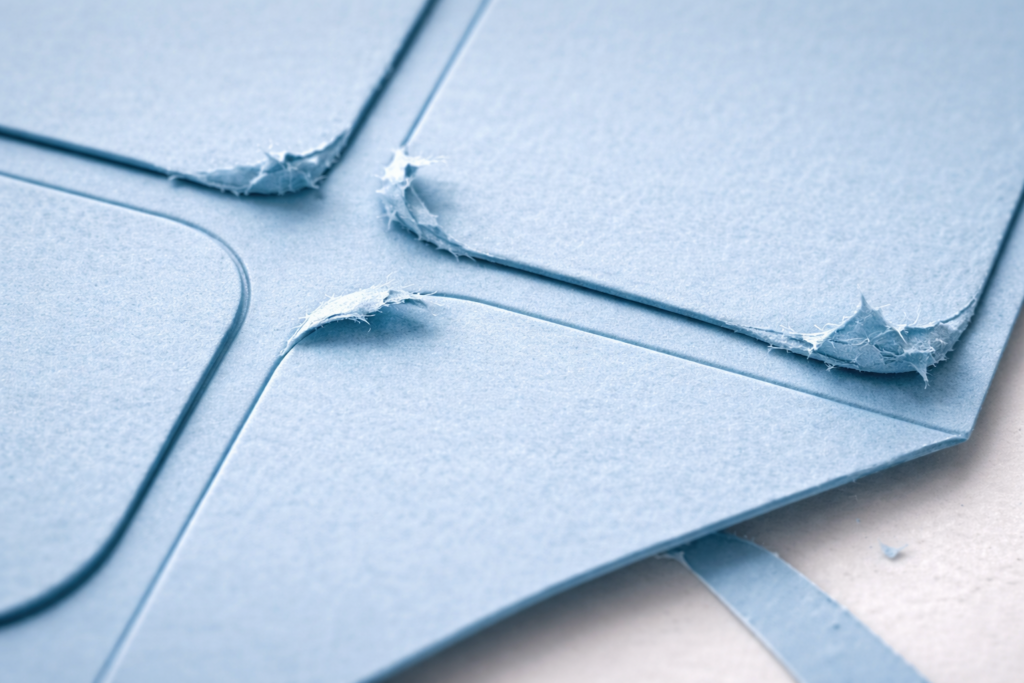
Pulled Corners
1. Slow Down the Cut Speed
Slower speeds often give cleaner results, especially on detailed designs. If your cut is snagging at the corners rather than mid line, speed will be the issue.
Not meeting Start to End
1. Secure Your Material Properly
Check your mat for debris as this will prevent your media from fully adhering to the mat. The thinner your material, the more debris becomes an issue. If your material is moving mid-cut you can use a little washi tape (or other low tack tape) to secure, just be sure to adhere well and avoid your rollers.
2. Recalibrate your machine
This one is for all ScanNCut users: recalibrate your machine regularly. Whenever you move your machine, use a drawing pattern (4 or 5), or any time the machine skips due to the material catching.